Jukebox software for Windows 10 and 11
Digital jukebox software that collects for you
URBBOR ROCKOLA turns a touchscreen PC into a digital jukebox for bars, restaurants and businesses: customers pick music and videos, pay with bills or coins, and the jukebox keeps the books for you.
Digital jukebox for bars · touchscreen jukebox software
URBBOR ROCKOLA
Turn a touchscreen PC into a digital jukebox for bars and businesses that takes the money for you: music and videos from your drive, YouTube, credits, and a bill and coin acceptor.
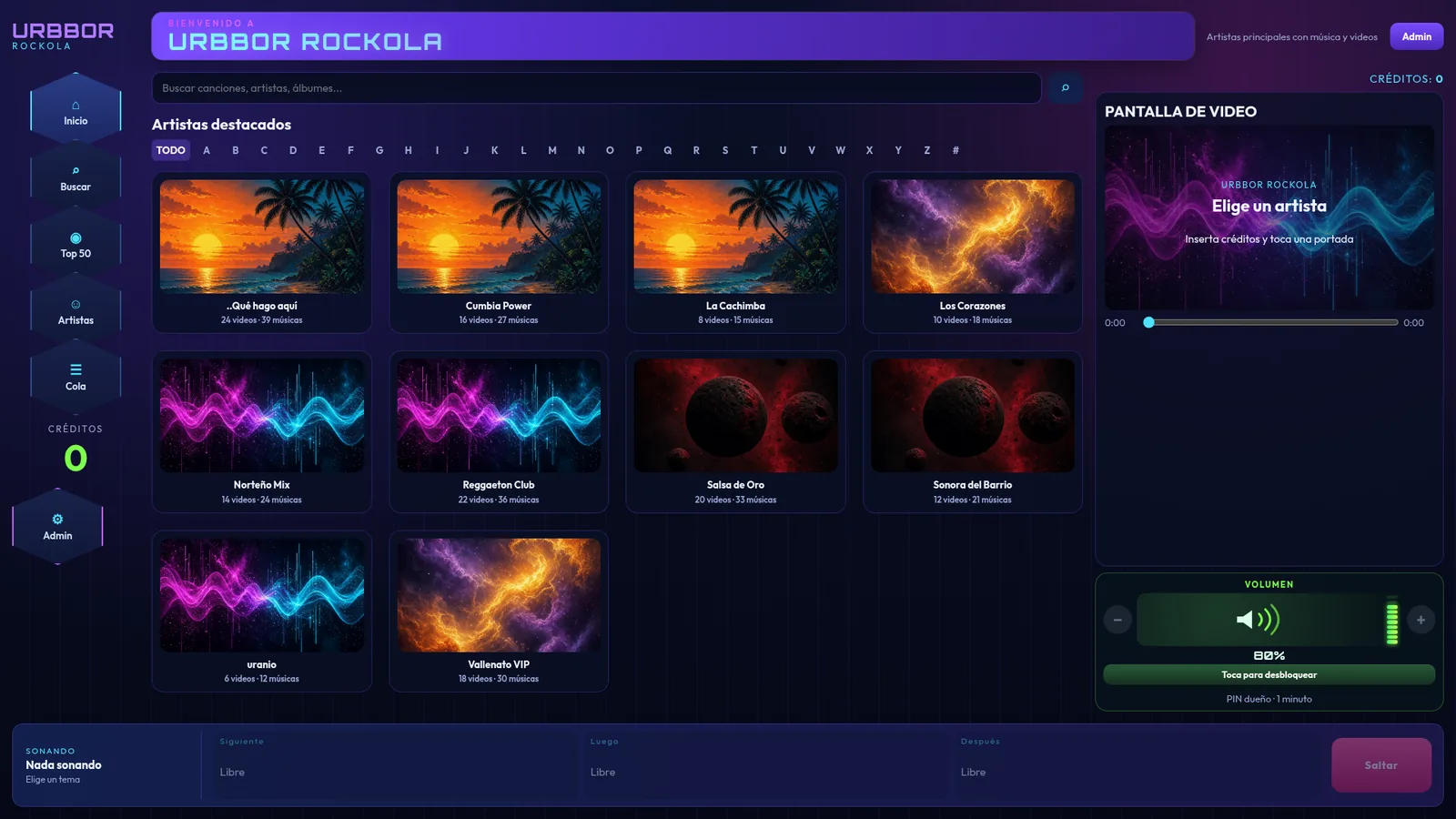
Screenshots of the real interface with a demo library.
- Touchscreen catalog by artist with cover art, search, an A–Z bar, a Top 50 of the most-played songs and the play queue always in view.
- Music and videos from your drive: scans D: or any folder and takes the cover from the file or from an image next to it. Refresh the library without stopping the current song.
- Built-in YouTube: customers search, pick a video, and it joins the same queue at the price of a song. No API key needed; sign in to YouTube Premium once and it stays signed in.
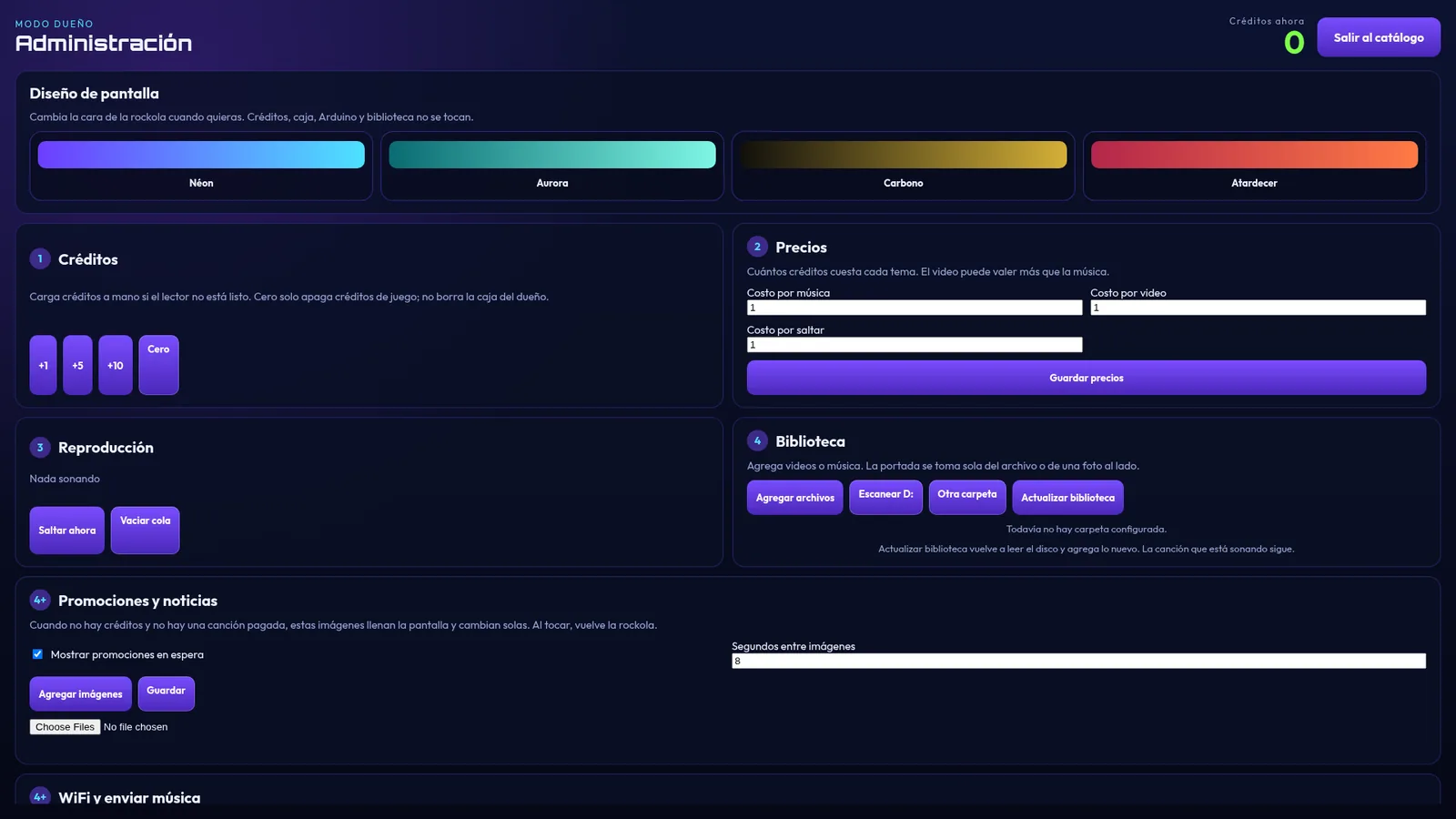
- Credits and pricing: set the cost per song, per video and per skip. Add credits manually (+1, +5, +10) when needed.
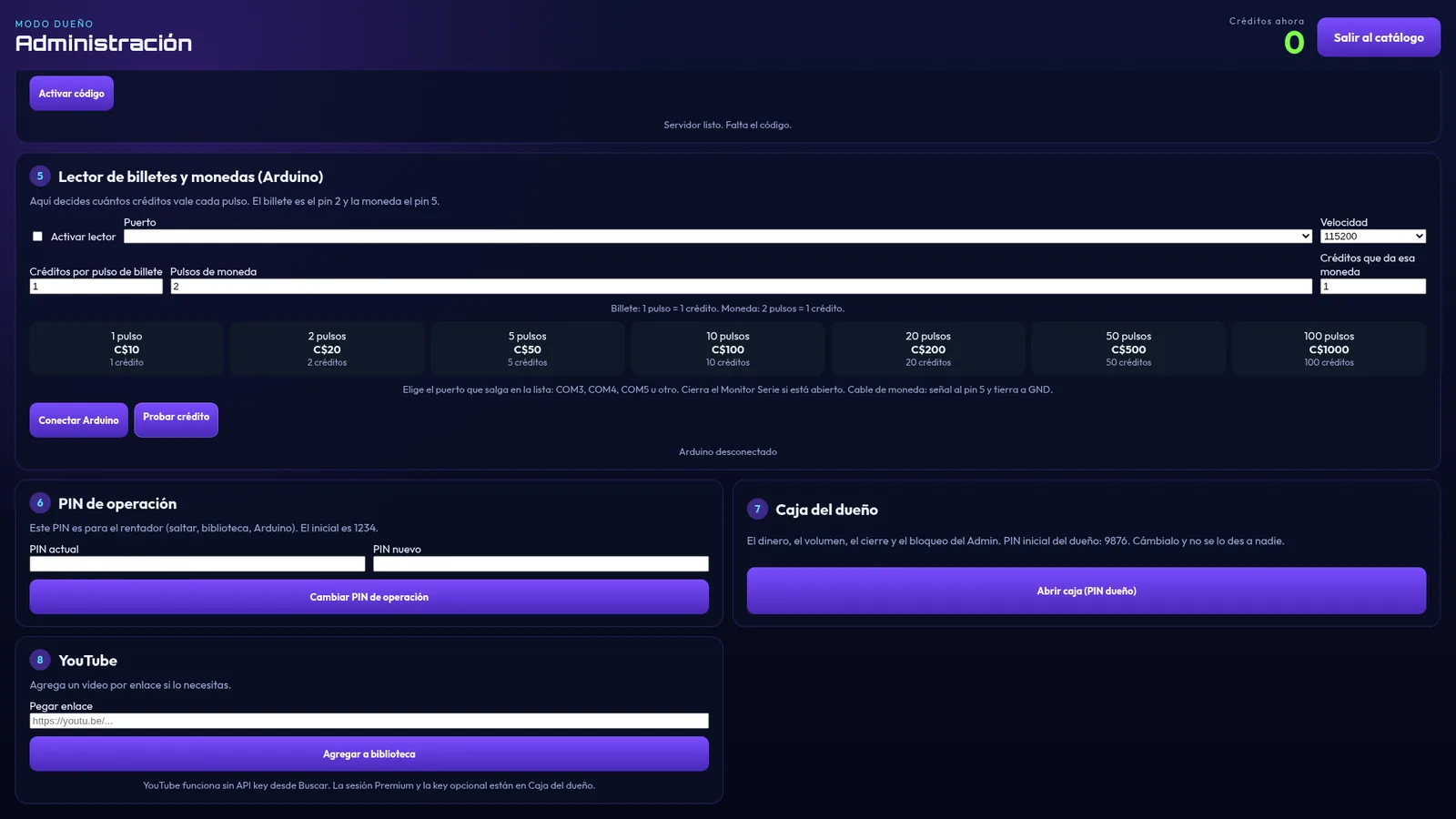
- Bill and coin acceptor support with an Arduino Leonardo: you decide how many credits each bill or coin pulse is worth.
- Owner's cash box with its own PIN: money for the period, acceptor credits, manual credits, breakdown by bill, history and cash-outs.
- Two PINs: an operator PIN for whoever rents the jukebox and an owner PIN. You can lock the operator's Admin.
- Full control: volume, closing time (and PC shutdown), start with Windows, and Alt+F4 blocking so nobody closes it.
- Background music when nobody is playing songs (no credits charged) and promotions with your own images while idle.
- 4 screen themes (Neon, Aurora, Carbon and Sunset), a video screen on a second monitor and its own touch keyboard.
- Music from your phone over Wi-Fi: with a link on the same network or the ROCKOLA URBBOR Android app, songs are saved straight to the jukebox's drive.
Windows 10 or 11, 64-bit · touchscreen recommended · Internet only for YouTube
What is a digital jukebox?
A digital jukebox is a touchscreen computer that replaces the old record jukebox: it stores thousands of songs and videos on its drive, charges credits for each track and plays them on your speakers and on a video screen.
URBBOR ROCKOLA is the program that does all of that on Windows 10 and 11: a touchscreen catalog by artist with cover art, built-in YouTube, bill and coin acceptor support, an owner's cash box and full control of the machine.
Made for
- Bars and pubs that want music all day without anyone babysitting it.
- Restaurants, pool halls and venues where customers choose — and pay for — the music.
- Operators who rent jukeboxes to several venues: an operator PIN for the renter and an owner PIN with its own cash box.
- Parties and events with a video screen on a second monitor or TV.
What you need to build one
- A PC or mini PC with 64-bit Windows 10 or 11.
- A touchscreen (recommended) and speakers or an amplifier.
- Optional: a second monitor or TV for videos.
- Optional: a pulse-output bill or coin acceptor with an Arduino Leonardo over USB.
- Internet only if you'll use YouTube; music from the drive works offline.
We cover it in detail in how to build a digital jukebox step by step.
Frequently asked questions
Can I use my own music and videos?
Yes. The jukebox scans drive D: or any folder you choose and takes the cover from the file or from an image next to it. With URBBOR ORGANIZER you can sort it and add cover art automatically.
Does it work without Internet?
Yes. Music and videos from the drive work offline; only YouTube needs a connection.
How does the jukebox charge?
Each song, video or skip costs the credits you set. Credits come in through the bill or coin acceptor or you add them manually in Admin, and the owner's cash box keeps the money for the period, a breakdown by bill and cash-outs. More in the bill acceptor guide.
Can customers close the program?
No. You can block Alt+F4, make the jukebox start with Windows and protect Admin with a PIN.
Is it a monthly subscription?
No. It's a one-time payment per PC: you buy the license once and activate it with that computer's code.
Can I send music from my phone?
Yes. Over Wi-Fi, with a link on the same network or the ROCKOLA URBBOR Android app, songs are saved straight to the jukebox's drive.
Related guides
How to build a digital jukebox, step by stepGuide to building a touchscreen digital jukebox for a bar: which PC and screen to use, sound, bill acceptor, jukebox software, music and pricing setup.Read guide →
 Jukebox with a bill and coin acceptor: how it works and how to connect itHow to connect a bill or coin acceptor to a digital jukebox with an Arduino Leonardo, how many credits to give per pulse and how the owner's cash box works.Read guide →
Jukebox with YouTube: how to add YouTube videos to your jukeboxHow a digital jukebox with built-in YouTube works: customers search, pick a video and pay like a song. No API key, and no ads with YouTube Premium.Read guide →
Jukebox with a bill and coin acceptor: how it works and how to connect itHow to connect a bill or coin acceptor to a digital jukebox with an Arduino Leonardo, how many credits to give per pulse and how the owner's cash box works.Read guide →
Jukebox with YouTube: how to add YouTube videos to your jukeboxHow a digital jukebox with built-in YouTube works: customers search, pick a video and pay like a song. No API key, and no ads with YouTube Premium.Read guide →
 How to choose jukebox software for your bar: 10 key pointsWhat to check before buying jukebox software: touchscreen, bill acceptor, cash box and reports, PINs, YouTube, video, one-time license and support.Read guide →
Other URBBOR programs
Ready to get started?
Message us on WhatsApp and we'll help you choose, install and activate your program.